In This Article
Portable Charger Rental in 2026: Convenient Lifesaver or Pricey Habit?
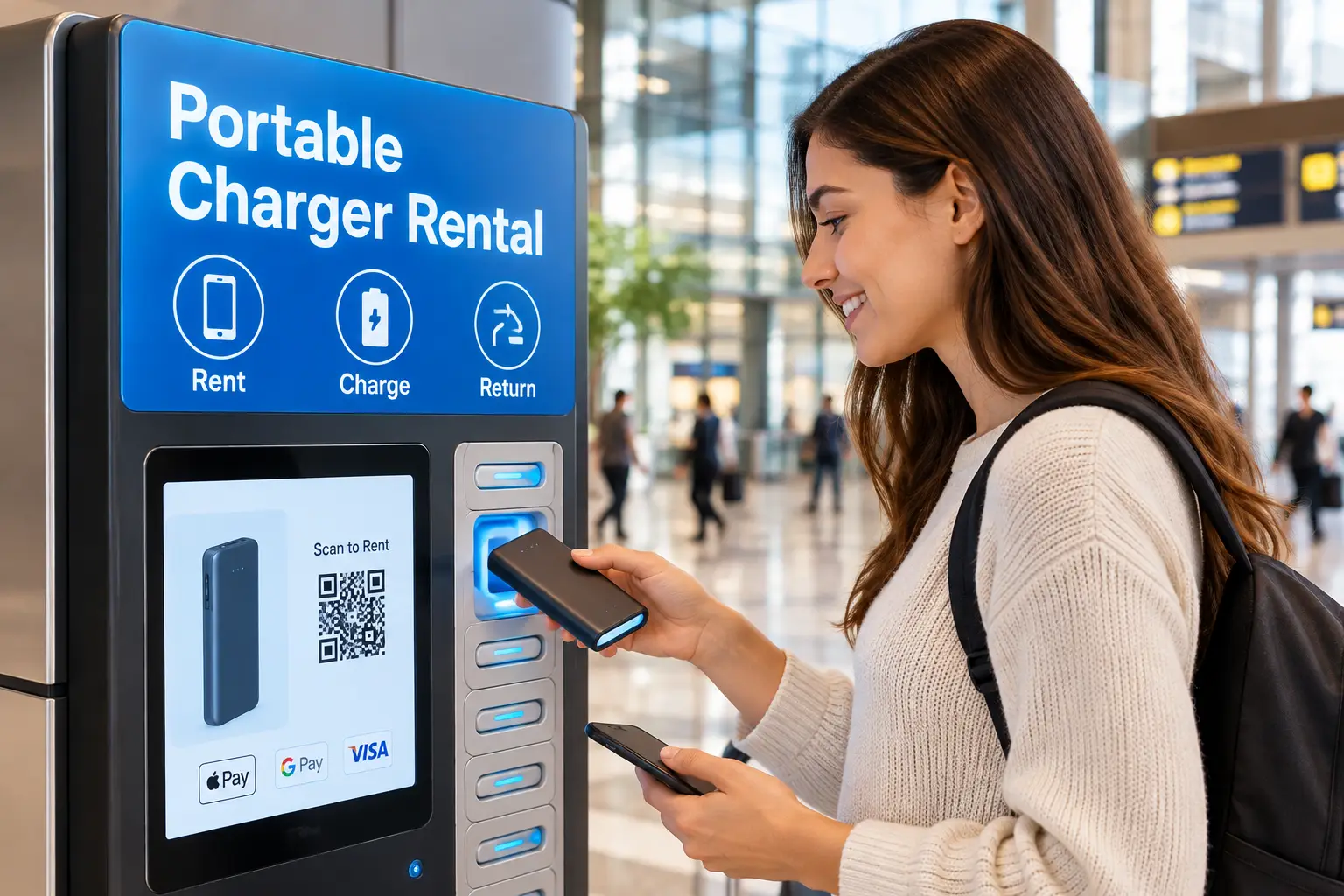
You’re at a stadium, your digital ticket lives on your phone, and the battery icon just turned red. Somewhere near the concession stand, a glowing kiosk promises salvation: scan a QR code, grab a power bank, keep going. That’s portable charger rental in a nutshell — and in 2026, it’s everywhere, from theme parks and casinos to airports, college campuses, and shopping malls.
What Is Portable Charger Rental?
Portable charger rental is a pay-as-you-go service where you borrow a charged power bank from a self-service kiosk, use it to charge your phone on the move, and return it to any station in the same network. Fees are usually billed per hour or half hour, with a daily cap and a non-return penalty.
Under the hood, these rental packs are ordinary lithium-ion batteries wrapped in a tracking shell with built-in cables. The concept borrows from the broader sharing economy: you pay for access instead of ownership. And for a one-off emergency, that’s a genuinely great deal.
Here’s the catch most people only discover on their card statement: rental fees add up fast. Published rates we found for US networks range from roughly $2 per half hour to $5 per hour, with daily maximums around $45-$50 and similar penalties if you don’t return the pack. Rent twice a month and you’ve spent more than a quality power bank costs — one you’d own for years.
So this guide does two jobs. First, it explains how phone charger rental really works, what it costs, and when it makes perfect sense. Second, it walks through seven real power banks available on amazon.com that cover the same need permanently, from budget pocket packs to laptop-grade bricks. By the end, you’ll know exactly when to tap the kiosk — and when to stop renting and start owning.
Quick Comparison: Portable Charger Rental vs. Owning a Power Bank
Before diving into products, here’s the big-picture trade-off at a glance.
| Factor | Portable charger rental | Budget power bank (e.g., INIU 45W 10,000mAh) | Premium power bank (e.g., Anker 737 Power Bank) |
|---|---|---|---|
| Upfront cost | $0 | Around $20-$30 | Around $80-$120 |
| Typical cost per use | ~$2-$5 per hour, capped ~$45-$50/day | $0 after purchase | $0 after purchase |
| Availability | Only where kiosks exist | Always in your bag | Always in your bag |
| Charges a laptop? | Rarely | No | Yes (up to 140W) |
| Return deadline/penalty | Yes | No | No |
| Best for | One-time emergencies, forgotten gear | Daily phone backup | Travelers, remote workers, multi-device users |
Looking at this table, the math tilts quickly. A power bank rental wins only when you truly forgot your own gear or need power once or twice a year; after just a few hours of rental time, the INIU 45W 10,000mAh has effectively paid for itself. Meanwhile, the Anker 737 Power Bank does something no kiosk pack we found can match: it powers a laptop, which rental networks are built around phones, not MacBooks.
💬 One click helps other shoppers make an informed choice too! 😊
Top 7 Power Banks That Beat a Portable Charger Rental: Expert Analysis
Every pick below is a real product sold on amazon.com in 2026. We didn’t test these units hands-on; instead, the commentary is based on comparing published spec sheets and the aggregated sentiment in 2026 review roundups and customer feedback. Prices are ranges at the time of writing — check the current price before you buy.
1. INIU 45W 10,000mAh Compact Power Bank — best everyday rental replacement
If you want the closest thing to a kiosk pack you never have to return, this is it. The INIU 45W 10,000mAh Compact Power Bank squeezes 10,000mAh into a slim, pocketable body with a 45W USB-C Power Delivery port.
In practice, 45W is overkill for most phones — but that headroom means it fast-charges any modern iPhone or Galaxy at full speed and can even top up a tablet or Nintendo Switch. At roughly 37 Wh, it’s far below the 100 Wh airline carry-on limit, so it flies without paperwork.
Based on comparing specs, this is the ideal pick for commuters, students, and anyone who’s rented a charger at a concert more than once. Its biggest advantage over a rental is time: it’s already charged and in your bag before the battery panic starts.
Across the 2026 roundups we consulted, reviewers repeatedly named it a top value pick, praising its size-to-speed ratio and INIU’s 3-year warranty; one noted it lacks a clear power-in/power-out indicator.
Pros:
- ✅ 45W USB-C output charges phones at top speed
- ✅ Slim, light design disappears into a jeans pocket
- ✅ Long 3-year warranty for a budget bank
Cons:
- ❌ Basic battery indicator instead of a percentage display
- ❌ Not enough capacity for a full laptop charge
Typically priced in the $20-$30 range, it’s about the cost of one long day of rental — outstanding value.
2. Miady 2-Pack 10,000mAh Power Bank — two backups for one price
The Miady 2-Pack 10,000mAh Power Bank solves a problem kiosks can’t: keeping two people charged at once, without two rental fees.
Each unit holds 10,000mAh, enough for roughly two full charges of a typical smartphone once you account for conversion losses. Charging speeds are modest compared with the 45W INIU, so think “steady overnight-style refuel” rather than “15-minute sprint.”
On paper, this is the smartest buy for couples, parents, or roommates who go to the same festivals and theme parks. Leave one in the car, one in the backpack, and you’ve effectively built your own private charging network. Families who rent chargers at amusement parks will feel this savings the most, since rental fees multiply per person.
Aggregated customer feedback generally highlights the value of getting two units and dependable everyday performance, while common complaints center on slower charging and a basic, no-frills build.
Pros:
- ✅ Two full power banks in a single purchase
- ✅ Great for families and shared trips
- ✅ Simple to use with no learning curve
Cons:
- ❌ Slower charging than premium USB-C PD models
- ❌ Plain plastic build feels budget-grade
Usually found in the $20-$35 range for the pair, it’s the lowest cost-per-unit option on this list.
3. INIU 20,000mAh 22.5W Power Bank — most capacity per dollar
The INIU 20,000mAh 22.5W Power Bank doubles the fuel tank without doubling the bulk — INIU markets it as one of the smallest banks in its class.
At 20,000mAh (about 74 Wh), you’re looking at roughly four phone charges, or a full weekend of camping, conference-going, or road-tripping without a wall outlet. The 22.5W output is slower than 45W, but here’s what to weigh: for overnight hotel top-ups or slow trickle charging during a long event, speed matters far less than reserve capacity.
This model fits festival-goers, hikers, and anyone who’s watched a rental kiosk run out of charged units. One 20K bank essentially replaces three or four separate kiosk visits over a weekend.
Review sentiment we found is consistently positive about capacity-for-price, with roundups naming it a “best value” pick; the most common trade-off cited is slower charging versus higher-wattage rivals.
Pros:
- ✅ Around four phone charges per full battery
- ✅ Compact for a 20,000mAh capacity bank
- ✅ Comfortably under the 100 Wh flight limit
Cons:
- ❌ 22.5W output is slow for tablets
- ❌ Takes several hours to refill itself
Generally priced around $25-$35, it’s arguably the best “set it and forget it” value here.
4. Anker MagGo Power Bank 10K (Qi2) — cable-free iPhone charging
The Anker MagGo Power Bank 10K (Qi2) snaps magnetically onto the back of compatible iPhones, so there’s no cable to forget — the most common reason people end up paying for a phone charger rental.
Its Qi2-certified magnetic wireless charging delivers up to 15W, which is noticeably faster than older MagSafe-style knockoffs limited to 5-7.5W. That matters in real life: you can keep scrolling a map or taking photos while the pack rides on the back of your phone. It also has a USB-C port for wired charging when you need extra speed or want to charge earbuds.
Based on the specs, this one is aimed squarely at iPhone 13-and-newer owners (and Qi2-capable Android phones) who hate cords. Wireless charging is less efficient than wired, so expect slightly fewer full charges than the raw 10,000mAh suggests.
Aggregated reviews tend to praise the strong magnetic hold and the convenience; recurring criticisms involve warmth during wireless charging and weight added to the phone.
Pros:
- ✅ Qi2 magnetic charging at up to 15W
- ✅ No cable needed for compatible phones
- ✅ Extra USB-C port for wired devices
Cons:
- ❌ Wireless charging wastes more energy as heat
- ❌ Adds noticeable weight to your phone
Expect a price in the $50-$70 range — worth it if cables are your nemesis.
5. Anker Power Bank 20,000mAh 87W (Built-in USB-C Cable) — never forget a cord again
The Anker Power Bank 20,000mAh 87W bakes a USB-C cable right into the body, which mirrors the best feature of rental kiosk packs: everything you need is attached.
The 87W ceiling is the headline. In practice, that’s enough to charge many ultrabooks and smaller laptops, not just phones. A digital display shows the exact remaining percentage — far more useful than four vague LED dots when you’re deciding whether to make it through a flight.
What most buyers overlook: built-in cables are a convenience and a wear point. Reviews of integrated-cable designs in general flag cable durability as the long-term question, so treat the cable gently and don’t yank it at sharp angles.
This bank fits remote workers, students carrying a laptop and phone, and frequent flyers. Review roundups in 2026 list it among the best overall USB-C picks for power users, praising the display and built-in cable; the usual complaint is bulk compared with 10K models.
Pros:
- ✅ Built-in USB-C cable you can’t leave behind
- ✅ 87W output handles many laptops
- ✅ Precise percentage display
Cons:
- ❌ Heavier than pocket-sized 10K banks
- ❌ Integrated cable can’t be swapped if damaged
Usually priced around $40-$60, it delivers laptop-grade power at a mid-range price.
6. Anker Laptop Power Bank 25,000mAh 165W — the mobile charging station
Think of the Anker Laptop Power Bank 25,000mAh 165W as a personal charging kiosk you carry yourself. It’s built to run multiple devices simultaneously.
With 165W total output and integrated cables, you can charge a laptop, phone, and earbuds at the same time — something no phone-focused rental pack is designed for. At 25,000mAh, it stays in the “under 100 Wh” zone that airlines generally allow in carry-ons without approval, which is the sweet spot for business travelers.
The trade-off is physical: at around 1.3 pounds per published specs, this is a backpack bank, not a pocket one. Honestly, if you only charge a phone, it’s more machine than you need.
This makes sense for digital nomads, photographers, and families sharing devices on long travel days. Review roundups widely call it a gold-standard premium pick, with very large review counts on Amazon; criticism mostly targets weight and price.
Pros:
- ✅ 165W total output for multiple devices
- ✅ Integrated cables reduce cable clutter
- ✅ Large capacity yet carry-on friendly
Cons:
- ❌ Around 1.3 pounds — strictly a bag item
- ❌ Overkill for phone-only users
Typically $80-$110 — justified only if you regularly charge a laptop away from outlets.
7. Anker 737 Power Bank (PowerCore 24K) — the proven premium workhorse
The Anker 737 Power Bank has been a reference point among high-output power banks for several years, and in 2026 it remains a frequently recommended premium choice.
It packs 24,000mAh (about 86.4 Wh) and up to 140W of output across three ports. A smart display shows remaining capacity, output wattage, and estimated time to full — helpful for knowing exactly how many charges remain before a long day. Its 140W input also means it refills itself much faster than budget banks, assuming you own a capable wall charger.
Based on comparing the specs with the newer Anker Laptop Power Bank 25,000mAh 165W, the Anker 737 Power Bank trades integrated cables for flexibility: you bring your own cables, and if one breaks, you just replace it. That matters for long-term ownership.
Reviews and community discussions consistently describe it as a reliable laptop-capable bank; the most frequent complaints are its weight and that buyers need a high-wattage charger to get the fast recharge.
Pros:
- ✅ 140W output charges most laptops
- ✅ Informative smart display with wattage readout
- ✅ Fast self-recharge with a capable charger
Cons:
- ❌ Heavy compared with phone-focused banks
- ❌ No built-in cables included in the body
Usually in the $80-$120 range — strong long-term value for heavy users.
Side-by-Side: The 7 Picks Compared
| Product | Capacity | Max output | Approx. Wh | Price range | Best for |
|---|---|---|---|---|---|
| INIU 45W 10,000mAh Compact Power Bank | 10,000mAh | 45W | ~37 Wh | $20-$30 | INIU 45W — daily commuters |
| Miady 2-Pack 10,000mAh Power Bank | 2 × 10,000mAh | Modest | ~37 Wh each | $20-$35 | Miady 2-Pack — couples and families |
| INIU 20,000mAh 22.5W Power Bank | 20,000mAh | 22.5W | ~74 Wh | $25-$35 | INIU 20K — festivals and camping |
| Anker MagGo Power Bank 10K (Qi2) | 10,000mAh | 15W wireless | ~37 Wh | $50-$70 | Anker MagGo 10K — iPhone users |
| Anker Power Bank 20,000mAh 87W | 20,000mAh | 87W | ~74 Wh | $40-$60 | Anker 87W — students with laptops |
| Anker Laptop Power Bank 25,000mAh 165W | 25,000mAh | 165W total | ~90 Wh | $80-$110 | Anker 165W — multi-device travelers |
| Anker 737 Power Bank | 24,000mAh | 140W | ~86 Wh | $80-$120 | Anker 737 — power users |
Wh figures are approximate, calculated at a 3.6-3.7V nominal cell voltage; check the label on your unit.
Reading across the table, the split is clear: the INIU 45W 10,000mAh Compact Power Bank and INIU 20,000mAh 22.5W Power Bank cover nearly every phone-only rental scenario for the price of one or two kiosk days. The three Anker laptop-class banks are the real upgrade over a power bank rental, because rental networks we researched focus almost entirely on phones. And the Miady 2-Pack 10,000mAh Power Bank quietly wins for households, where rental costs scale per person.
✨ Don’t miss these smart power picks!
🔍 Take your mobile charging to the next level with this carefully curated lineup. Click a highlighted item to check current pricing and availability. These picks will help you stay powered up all day — no kiosk hunting, no return deadlines, and no surprise fees on your card! 🔋⚡
How Portable Charger Rental Works: A Step-by-Step Guide
Sometimes renting is exactly the right move — say you flew in, your own bank is dead, and the show starts in an hour. Here’s how to rent a portable charger without getting burned on fees.
Step 1: Find a kiosk
Most networks — chargeFUZE, Brick, U Charge Up, Voltage Nexus, and others — have apps with live maps. Searching “portable charger rental near me” usually surfaces venue-specific info, too. Stadiums, casinos, theme parks, and university libraries are the most common hosts.
Step 2: Scan and pay
You typically scan a QR code with your camera or tap a card at the kiosk’s payment terminal. Expect a temporary authorization hold; some networks state that this hold is released several business days after the rental ends.
Step 3: Charge on the go
Rental packs usually come with built-in Lightning, USB-C, and sometimes Micro-USB cables. Plug in and keep moving — the meter is running.
Step 4: Return before the cap or deadline
Drop the pack into any open slot at a station in the same network. Wait for the app or screen to confirm the return before walking away. This single habit prevents most billing disputes.
First-timer tips
- ✅ Check the hourly rate and daily cap before you scan; they vary by venue.
- ✅ Screenshot the return confirmation.
- ✅ Note billing increments: some networks charge per started hour or half hour, so 61 minutes can cost two hours.
- ✅ Know the non-return price — often around $45-$50 — because that’s effectively what you pay if you lose it.
Real-World Scenarios: Should You Rent or Buy?
Abstract math is fine, but your habits decide the winner. Here are three common profiles.
🎟️ The once-a-year concertgoer
Maya goes to two or three big events a year and usually leaves her phone charger at home. For her, a portable charger rental of an hour or two per event costs well under $20 a year. Renting is perfectly reasonable — though a INIU 45W 10,000mAh Compact Power Bank in her bag would cost about the same as one annual season of rentals and last for years.
🎢 The theme-park family
A family of four spends a day at a park where everything runs through phones: tickets, ride reservations, mobile food orders, photos. If two family members rent at around $5 an hour, a long day can approach the daily caps for both. That’s tens of dollars in a single visit. The Miady 2-Pack 10,000mAh Power Bank or two INIU 20,000mAh 22.5W Power Bank units cover the entire day, every visit, for less than one day of double rentals.
💼 The road-warrior professional
Jordan flies twice a month with a laptop, phone, and earbuds. Rental kiosks won’t charge the laptop, and airport layovers are unpredictable. The Anker Laptop Power Bank 25,000mAh 165W or Anker 737 Power Bank is the only sensible option here — both stay under the 100 Wh carry-on threshold and handle all three devices.
The pattern
If you’d rent more than about three or four hours a year, owning almost always wins. Rental is the safety net; a power bank is the plan.
Problem → Solution: Fixing Common Rental and Power Bank Headaches
Problem 1: “I returned the charger, but I’m still being billed.” Solution: This usually means the kiosk didn’t register the return. Contact the network’s support with the date, time, and location, plus your screenshot. Going forward, always wait for on-screen confirmation.
Problem 2: “The kiosk is empty or every pack is half-charged.” Solution: Busy venues drain stations fast at peak times. Check the app’s live availability before walking over — or carry your own INIU 45W 10,000mAh Compact Power Bank so you never depend on stock.
Problem 3: “My rental charges painfully slowly.” Solution: Many rental packs are designed for phones and may not support the fastest charging standards your device uses. Close background apps, dim the screen, and turn on Low Power Mode. If you need speed regularly, a 45W bank or the Anker Power Bank 20,000mAh 87W fixes this permanently.
Problem 4: “I’m charged for a full extra hour after barely going over.” Solution: That’s the billing increment at work. Set a phone timer for 5-10 minutes before the next increment.
Problem 5: “My own power bank won’t charge my laptop.” Solution: Check the output wattage. A 22.5W or 45W bank won’t run most laptops properly; you need 65W or more — like the Anker 737 Power Bank or Anker Laptop Power Bank 25,000mAh 165W.
Portable Charger Rental Cost: The Real Math
Let’s put actual numbers on the decision. Published US rates we found during research include:
- chargeFUZE at venues such as LEGOLAND Florida and Cosm: about $5 per hour, capped at $45.
- U Charge Up in Detroit: $2.50 per half hour.
- Voltage Nexus, which launched a US kiosk network in 2026: $4 per hour, capped at $50.
- Some campuses partner with networks to offer free short-term rentals for students, with a fee — around $50 — if the pack isn’t returned.
Now the comparison:
| Scenario | Rental cost (approx.) | Own a budget bank | Own a premium bank |
|---|---|---|---|
| One 2-hour emergency | ~$8-$10 | Around $20-$30 upfront | Around $80-$120 upfront |
| 3 events/year, 3 hrs each | ~$36-$45/year | Same one-time cost | Same one-time cost |
| 2 people, 6 theme-park days | Could exceed $100/year | Miady 2-Pack ~$20-$35 once | Not needed |
| Non-returned pack | ~$45-$50 | — | — |
| Best for | Rare emergencies | INIU 45W — everyday users | Anker 737 — laptop users |
The takeaway: break-even arrives remarkably early. For a phone-only user, a budget bank pays for itself after roughly three to six hours of rental time. Even a premium bank like the Anker 737 Power Bank pays off within a year for anyone who rents monthly — and it charges a laptop, which rentals don’t. Ownership also has a long-term cost, but it’s small: lithium-ion banks gradually lose capacity over hundreds of charge cycles, so plan on replacing a heavily used bank every few years.
How to Choose a Portable Charger (Rental or Owned)
Whether you’re choosing between kiosk networks or buying your own, these criteria matter most:
- Match capacity to your day. 10,000mAh covers about two phone charges; 20,000mAh covers four. Don’t haul 25,000mAh for a phone-only day.
- Check output wattage. 20W+ for fast phone charging, 45W for tablets, 65W-140W for laptops. Wattage decides what you can charge.
- Look at the Wh rating if you fly. Under 100 Wh is generally carry-on friendly without airline approval.
- Decide on cables. Built-in cables (like rentals or the Anker Power Bank 20,000mAh 87W) prevent forgetting; detachable cables are easier to replace.
- For rentals, read the rate card. Hourly price, billing increment, daily cap, and non-return fee all matter.
- Buy from established brands with clear recall support. Accountability matters when something goes wrong.
- Consider who else needs power. Families benefit from multiple units, not one giant bank.
Power Bank Rental vs. Buying vs. Public Charging Stations
A third option deserves a mention: wall outlets and public charging lockers. Here’s how all three stack up in written form, not just a table.
Power bank rental buys freedom of movement. You keep walking, watching, and working while you charge. It’s the best answer when you’re stuck without gear in a venue that hosts kiosks. The weaknesses are cost, coverage gaps (no kiosk at the trailhead), and the return obligation.
Owning a power bank offers the same freedom of movement with none of the recurring fees. The only real weaknesses are remembering to charge it and remembering to bring it. Built-in-cable models like the Anker Power Bank 20,000mAh 87W shrink that second risk.
Public outlets and charging lockers are usually free or cheap, but they tether you to one spot. In an airport, that might be fine; at a concert, it means missing the show. Security experts have also long advised caution with unknown public USB ports, since a charge-only cable or your own wall adapter is the safer habit.
Put simply: own a bank for your routine, keep rentals as a backup for the days life ignores your routine, and treat public outlets as a last resort.
Features That Actually Matter (and Ones That Don’t)
Marketing pages love numbers. Here’s how to separate signal from noise.
✅ Matters a lot
- Wh rating — the real capacity figure, and the one airlines care about.
- USB-C Power Delivery output — decides whether your phone charges fast or slowly.
- A real percentage display — the Anker 737 Power Bank and Anker Power Bank 20,000mAh 87W show exact figures, so you never guess.
- Warranty length — INIU’s 3-year warranty on the INIU 45W 10,000mAh Compact Power Bank is notable at that price.
🤷 Matters less than you think
- Huge mAh claims on no-name banks — mAh is rated at cell voltage, so the usable energy delivered to your phone is always lower. Treat suspiciously giant numbers at tiny prices skeptically.
- Five or six ports — most people charge one or two devices at a time.
- Built-in flashlights — fun, rarely used.
⚖️ Depends on you
- Wireless charging — wonderful for iPhone users (hello, Anker MagGo Power Bank 10K (Qi2)), but less efficient than a cable.
- Integrated cables — great convenience, but one more part that can wear out.
Common Mistakes to Avoid With Phone Charger Rental and Power Banks
Mistake 1: Ignoring the billing increment. Rental networks often bill per started block. Returning at 1 hour 5 minutes can cost you two hours.
Mistake 2: Walking away before return confirmation. A pack that isn’t registered can keep accruing charges or trigger the non-return fee.
Mistake 3: Buying the cheapest no-name power bank. Recent recalls show that even big brands can have defective batches; unknown brands with no recall process are a bigger gamble.
Mistake 4: Packing a power bank in checked luggage. Spare lithium batteries belong in the cabin. If your carry-on gets gate-checked, pull the bank out first.
Mistake 5: Buying laptop-grade capacity for a phone. The Anker Laptop Power Bank 25,000mAh 165W is brilliant — for laptops. For a phone-only life, the INIU 45W 10,000mAh Compact Power Bank saves weight and money.
Mistake 6: Never recharging your own bank. A dead power bank is just a paperweight. Recharge it the night before any event, the same way you’d charge your phone.
Safety, Regulations, and Standards
Lithium-ion batteries store a lot of energy in a small space, so safety deserves real attention — whether you rent or own.
Recalls are real, even for major brands
The US Consumer Product Safety Commission has announced several large power bank recalls recently. In June 2025, for example, the CPSC announced that more than one million Anker PowerCore 10000 power banks (model A1263) were recalled because the battery could overheat. A further Anker recall followed in September 2025 covering additional model numbers, and a recall of Casely wireless power banks was reannounced in 2026 after more incidents were reported. The practical lesson: register your purchase, check your model and serial number against manufacturer recall pages, and stop using any bank that swells, smells, or gets unusually hot.
Flying with a power bank
Under FAA PackSafe guidance on lithium batteries, spare lithium batteries such as power banks must go in carry-on baggage, not checked bags. Batteries up to 100 Wh are generally allowed; those between 101 and 160 Wh need airline approval; anything larger is prohibited on passenger flights. Some US airlines add their own rules, such as requiring power banks to stay visible while in use. Every product in our top 7 sits under 100 Wh.
Certifications to look for
Check listings and labels for UL or ETL safety marks, FCC compliance, and UN 38.3 transport testing. Reputable rental networks maintain their packs, but if a rental unit looks damaged or swollen, don’t use it — return it and grab another.
FAQs
❓ How much does a portable charger rental cost?
❓ Can I rent a portable charger at the airport?
❓ What happens if I don't return a rental power bank?
❓ Is it cheaper to buy or rent a power bank?
❓ Can I return a rented charger to a different location?
Conclusion: Rent When You Must, Own When You Can
Portable charger rental is a genuinely clever service. When you’re stranded at a stadium with a dead phone and no cable, a kiosk that hands you power for a few dollars feels like magic — and in that moment, it’s worth every cent. It’s also a convenient safety net for travelers, students, and anyone whose day doesn’t go to plan.
But as a habit, renting is expensive. With published rates around $2-$5 per hour and daily caps near $50, a handful of rentals quickly outpaces the cost of owning a quality power bank. And rental packs are built for phones, not laptops.
That’s where the seven picks above come in. The INIU 45W 10,000mAh Compact Power Bank is the everyday replacement for most people. The Miady 2-Pack 10,000mAh Power Bank is the family hack. The INIU 20,000mAh 22.5W Power Bank covers festival weekends. The Anker MagGo Power Bank 10K (Qi2) frees iPhone users from cables. And the Anker Power Bank 20,000mAh 87W, Anker Laptop Power Bank 25,000mAh 165W, and Anker 737 Power Bank handle laptops — the one job rentals skip.
Whatever you choose, follow the basics: carry it in your cabin bag, stay under 100 Wh, check recall pages, and recharge it before you leave home. Then the next time you walk past that glowing kiosk, you can smile — and keep walking.
🔋 Power up before the battery panic hits!
⚡ Stop paying by the hour for peace of mind. Click a highlighted pick above to check current pricing and availability on Amazon, and choose the bank that fits your day — so your phone, tablet, or laptop stays charged wherever life takes you! 🚀
Recommended for You
- Hybrid Solar Power System: 7 Best Picks That Actually Deliver (2026)
- How to Use Solar Panels: 7 Best Picks & Proven Setup Guide (2026)
- Cost of a Generac Whole House Generator: 7 Proven Picks (2026)
Disclaimer: This post contains affiliate links. As an Amazon Associate, I earn from qualifying purchases made through these links, at no additional cost to you.
✨ Found this article helpful? Share it with someone who needs it! 💬🤗